I recently encountered a very strange error my Web Services were not working when developer mode is on. To enable error reports you can follow this link. After a lot of struggle I found out there was a bug listed under PrestaShop Forge portal stating Can't read orders with web service.
Wednesday, June 24, 2015

Enable Web Service for PrestaShop Shop

In this training module we would enable web service under PrestaShop Shopp
How to enable error reporting in PrestaShop

Saturday, June 20, 2015
How to View My Shop in Maintenance Mode
It is possible to put your shop into maintenance mode by going to: Back Office > Preferences > tick 'No' for Enable Shop. When in maintenance mode you may make changes to your shop without disrupting your customers' experience. When your changes are done, you can re-enable your shop by changing your Preferences.
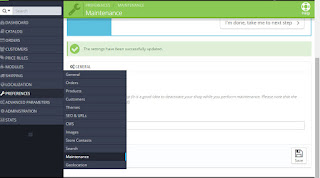
In maintenance mode, a holding page is displayed to all users expect those on the IP addresses configured in the PrestaShop Back Office. In this way, it is possible for you to make changes to your shop and view those changes on the front end before they are available to your customers:
Get your IP address from http://www.whatsmyip.org/
Go to Back Office > Preferences and enter your IP in the Maintenance IP field
Click Save
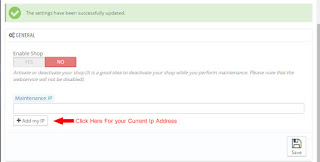
Note: Your IP address may change periodically; if you cannot access your front end in maintenance mode, update the Maintenance IP in the Back Office as described above.

In maintenance mode, a holding page is displayed to all users expect those on the IP addresses configured in the PrestaShop Back Office. In this way, it is possible for you to make changes to your shop and view those changes on the front end before they are available to your customers:
Get your IP address from http://www.whatsmyip.org/
Go to Back Office > Preferences and enter your IP in the Maintenance IP field
Click Save

Note: Your IP address may change periodically; if you cannot access your front end in maintenance mode, update the Maintenance IP in the Back Office as described above.
Wednesday, June 17, 2015
Rename admin Folder but why?
The admin folder holds the php scripts to manage your shop. Every customization or configuration that you make on your shop relies on this folder. So obviously you don't want any person sitting on there computer typing www.yourdomain.com/admin and guessing your password. It's better to change the "admin" folder name to something more secret and personal.
Why is it required to delete Install folder after installation of PrestaShop?
The reason for deleting install folder is that it contains the PHP code that configured your store. So it might be very easy for anybody who knows it is there to rerun the install process with erroneous information and mess up your store.
Steps to remove Install Folder:
Steps to remove Install Folder:
How to clear Smarty Cache PrestaShop
The following tutorial is going to show you how to clear Smarty cache in PrestaShop 1.6.x.
There are 2 ways to clear cache Smarty Cache
Way 1: Clear Cache in Prestashop admin panel
Way 2 : Clear cache manually
Follow these instructions to clear smarty cache
Subscribe to:
Posts (Atom)